How to Pull Foreclosure County Data for DeSoto County, MS
A foreclosure list shows homes that a lender is taking back because the owner stopped paying the loan. To find foreclosure records for DeSoto County, Mississippi (MS), use DeSoto County Document Center. No account is needed. It is free to use. No VPN is needed. You can download a PDF.
Also known as: foreclosure notices, foreclosure sale list, foreclosure auctions.
What you need
What it is
Notices of sale by substitute trustee, posted by DeSoto County as PDF files. Each PDF is named by its sale date.
Why it matters
You see the borrower, the lender and the sale date before the auction, while there is still time to reach the owner.
The fields you get
- Borrower
- Sale date
- Substitute trustee
- Lender
- Deed of trust book and page
- Legal description
The Last Uploaded column showed files added within the past few days.
Follow these 5 steps
-
Open the Foreclosure Notices folder
Go to the DeSoto County Document Center, Foreclosure Notices. You do not need an account. -
Read the file list
Scroll down to the table. Display Name is the sale date, for example12.03.2026. Last Uploaded shows when the file was added.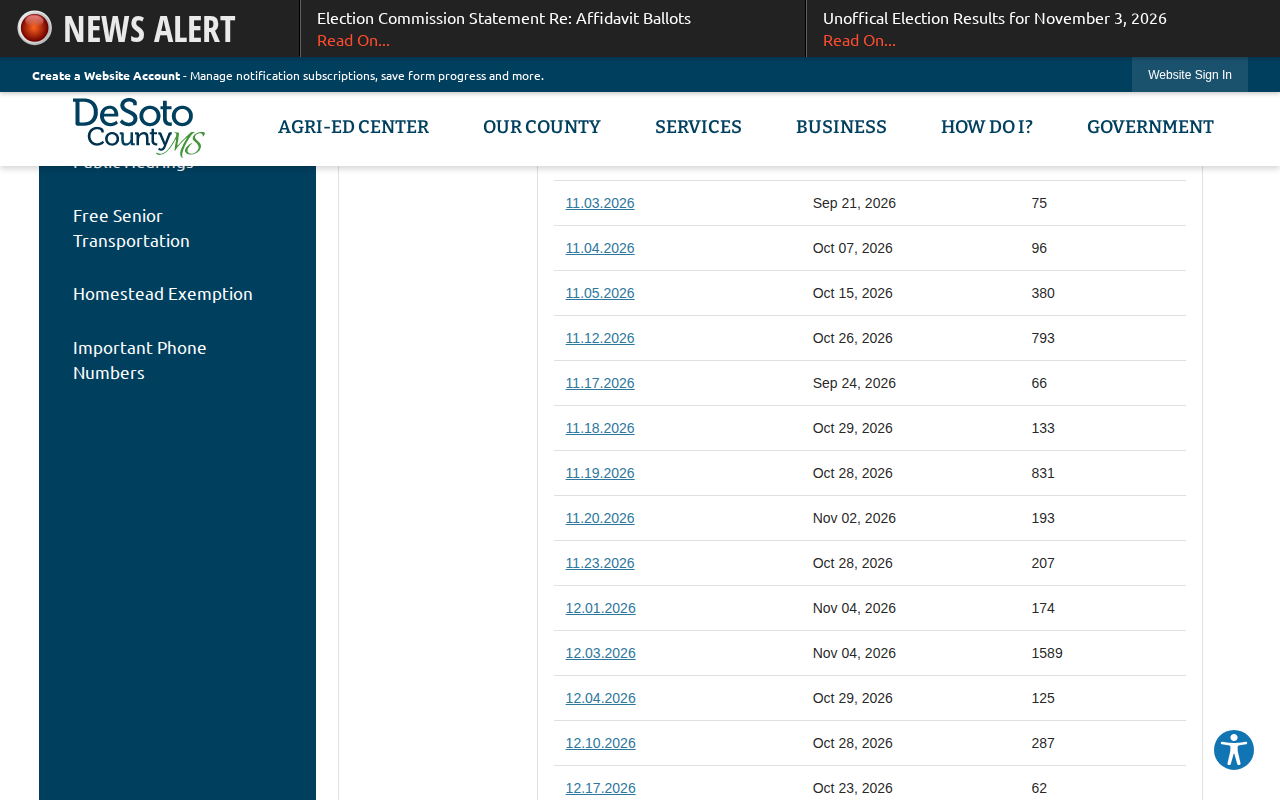 Enlarge
-
Find the new files
Read the Last Uploaded column and note the files added since your last pull. -
Open a PDF
Click a file name. Save the PDF if you want to keep it. -
Type the record into your sheet
Read the notice. Write down the borrower, the sale date, the substitute trustee and the legal description. One file can run several pages.
Watch out for these
- The PDF we opened was a scan, so its text could not be copied. Plan to type the details by hand.
- The notice we opened gave a lot and section legal description in place of a street address.
Common questions
Why are the files named with dates?
Other lists in DeSoto County
We only have this list for DeSoto County so far. See all Mississippi guides.
Foreclosure in other states
See every guide
Do not want to do this by hand?
CountyPull pulls this list for you automatically.